


Your business. With a secretary.
Keep working.
Kai takes the call.
When you can’t pick up, Kai answers, takes the details and saves the conversation. Bring your calls, messages, email campaigns and meetings together, so following through is easier when you get back to your customers.
Live demo: 1 (417) 835-0402

Trusted by teams using KaiCalls

Great Family Artists

BBB Attorneys

Starrs Party

Awesome Backyard Parties

Rincón Recovery Room

Rincón Fitness Center
The whole customer relationship. With Kai.
Bring in business.
Get on with yours.
Campaigns to reach customers. Calls and messages to keep them moving. A secretary to help with the work in between.
Watch the services come together · 35 seconds
Sound like your day?
All the tools.
Still all on you.
- Send the campaign.
- Answer the phone. Call them back.
- Find the email. Reply to the text.
- Update the contact. Book the time.
- Take the notes. Brief the team.
The services together.
Kai on the follow-through.
Reach out, answer, call back and follow up—with customer details close at hand. You set the direction. Kai helps carry it forward.
Less on your plate.
Here’s what that looks like.
Pick the work you want help with.
“We have openings. I should email our customers.”
Put your customer list to work.
Run full email and text campaigns. Choose who to reach, prepare your message and review it before launch. Give past customers a reason to get in touch again.
You choose the audience and approve the campaign.
Explore email & text campaigns
Email campaigns · SMS campaigns · Sending domain · Reply inbox
Start with the work that’s piling up.
Keep your number. Connect your mailbox. Add the services you need.
First, see a call handled.
A caller becomes a saved contact, a clear summary and a next step. Watch the actual product, from picking up to following through.
In their own words
More time for the business.
“It gives us more time to work on the business.”
Ken Rent / Starrs Party
Watch the customer storyCase study
How a tent and party rental shop got $443K in orders from calls the crew couldn’t answer
- in orders from Kai callers
- $443K
- orders
- 269
- first-time customers
- 129
“When we implemented KaiCalls, all of a sudden, customers were calling in and actually talking to a person.”Pete Gallic
“It’s replaced a full-time employee for us at a cost of maybe 20% of that.”Pete Gallic
Pete recorded this on his phone. The cuts here are edited from that one recording. The call and cost numbers he mentions are his own estimates. The order counts on this page are our own count from Ken Rent’s order data.
Read the case studyStart with the calls you miss.
Keep the number they know.
Keep your number.
Nothing to port. Customers dial the number they already have, on the phones you already use.
Setting up a number in four steps: pick (512) 555-0168, choose rings you first, then Kai, switch on forwarding for the calls you don't pick up, and place a test call. The test call passes and the number is ready.
Your phone rings first.
Forward only the calls you don’t pick up. Forward-all would send Kai every call and your own phone would stop ringing.
A call from Maria, (512) 555-0142, rings your phone three times and you can't pick up. Kai picks up for Williams Plumbing, takes down what Maria needs, texts you a summary and saves her as a lead. The call ends answered.
Kai takes the work.
Kai gets the name, the job, the address and the timing, and answers the common questions.
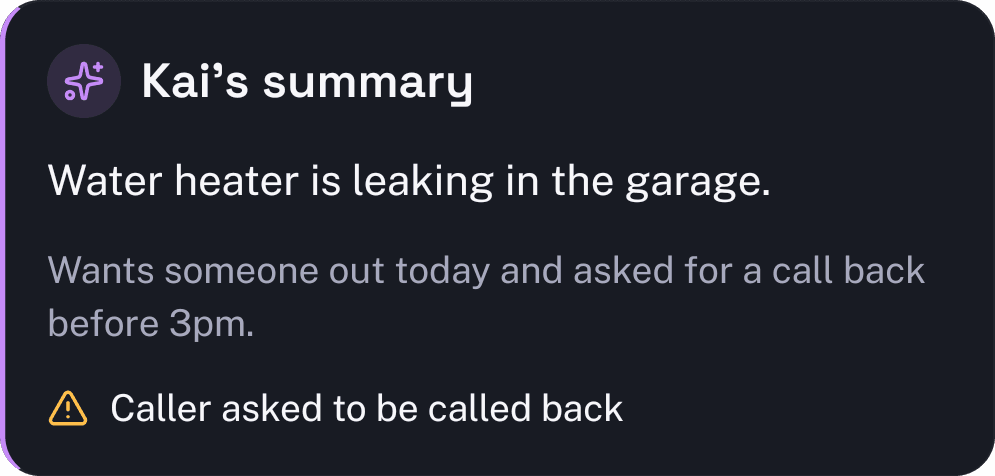
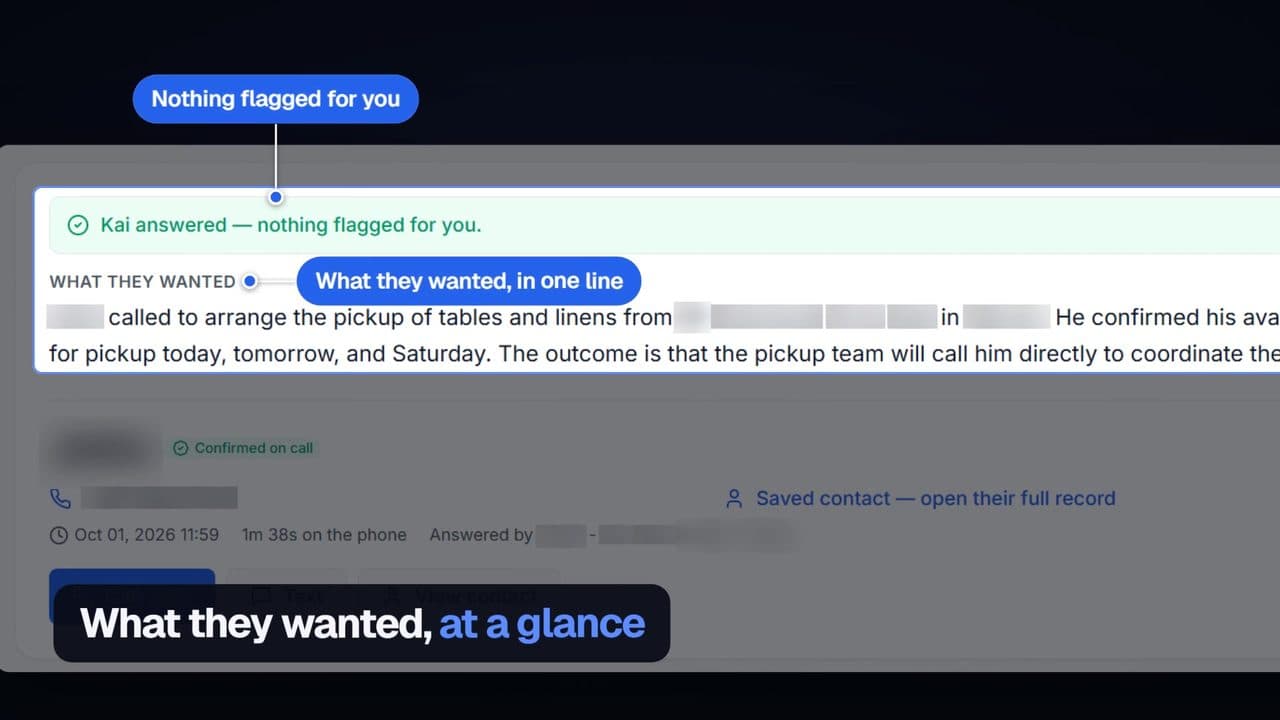
A short call with Dave appears line by line. He has a water heater leaking in the garage and wants someone out tomorrow morning. The transcript folds into one line under What they wanted, which drops into a lead card for Dave marked Hot.
You get a text.
The details land on your phone, ready for you to call back and book the job.
Your linenowHot lead: Dave needs a drain cleared before Tuesday. Kitchen sink, second time this year. Call back today.
Delivered
Explore the work beyond the call.
Your number is one place to start. Connect email, add campaigns and bring Kai into your meetings when you’re ready.
Introducing the first agentic phone number.
Turn the sound on.
Ditch thevoicemail.
Nobody leaves them. Nobody listens.
Just callKai.
Your phone rings. If you can’t get it, Kai does.
Dumb to smart.Cool again.
We made your business phone cool again.
Nobody leaves voicemails anymore.
So Kai answers instead, day or night, and writes up every call for you.
30% of the 4,715 calls Kai answered this year came when the office was closed. Read the 2026 call report →
A clock runs from 5 PM to 8 AM. After closing time four calls come in, at 6:12 PM, 8:40 PM, 11:05 PM and 6:30 AM, and Kai answers each one. In the morning view all four calls are listed as answered, with what each caller needed.
- Calls Kai answered in the last year
- —
- Spent on the phone with callers
- —
- Average call, start to finish
- —
Live from real calls, updated just now. Test calls and calls we placed ourselves aren't counted.
Hear Kai answer a call for a business like yours.
Choose a business similar to yours to see what Kai handles. Then call the demo line from your phone to hear the greeting, ask a question, and try leaving a callback request.
HVAC
Kai for HVAC
Peak-season overflow, no-heat emergencies, maintenance scheduling
One demo line for every industry. Ask a question or leave a test message.

Who it’s for
See how Kai answers the calls your kind of business gets.
- Law firms
- After-hours calls
- Dental offices
- Roofers
- HVAC
- Plumbers
- Real estate agents
- Insurance agents
- Small business
- Every other business
Also see: AI answering serviceAI receptionistAI business phone systemAI receptionist cost guide
Live in minutes.
Keep your number.
Rather talk it through first? Call Kai now and ask how setup works.
Tell Kai about your business.
Create your account. Add your website if you like, and Kai reads your services and hours from it.
Get your new number.
We pick a number for you. Want a different area code? Swap it. Your first week is $2.
Call it. Then forward your line.
Hear Kai answer on your new number first. Then forward only the calls you don’t pick up: your phone rings first, Kai takes the rest. Your number and your carrier stay the same.
Step-by-step forwarding for
- Verizon
- AT&T
- T-Mobile
- Mint Mobile
- Metro by T-Mobile
- Xfinity Mobile
- Other carriers and landlines
Your line runs on
- Phone networks
- Twilio


- Speech and language
- OpenAIAnthropic




Choose your starting point
Our pick for most businesses
Kai Line$79 a month
Your business line, with a secretary. When you can’t pick up, Kai answers and sends you the details.
Includes ~170 Kai-answered calls/mo.
$2 for your first week, then $79/mo. Cancel anytime.
Introductory offer for eligible first-time subscribers; cannot be combined with another discount. Secure checkout confirms your total.
Every paid plan includes a 30-day money-back guarantee.
Before you activate
Can I keep my current business number?
Yes. You can forward calls from your existing number to Kai, or give customers your new Kai number. Forwarding is optional and depends on your carrier. Paying does not change your existing number or turn forwarding on.
What happens after I pay?
Payment starts your plan. Finish number setup and any required verification, then make a private test call before connecting customer calls. Number availability and verification still apply. Texting needs separate carrier approval.
What if Kai is not right for my business?
Every paid plan includes a 30-day money-back guarantee. You can cancel your subscription in billing. Turning off call forwarding with your carrier is a separate step.
This is your business phone plan. Email campaigns, messaging and meetings have their own setup and allowances. See what your plan includes before choosing the services you need.
Why it costs less than an answering service
No call center
There's no room full of operators to pay for. That cost never lands on your bill.
Kai answers every call
Day or night, Kai picks up, takes the details, and gets them to you.
No per-minute charges
Kai Line is $79 a month, flat. A long call costs the same as a short one.
Need a different size? Kai Backup is $10/mo and Kai Office is $349/mo. See every plan
You stay in charge
What Kai won't do without you
Bring calls, campaigns and follow-up together without handing over every decision. You set Kai’s instructions and review the work that needs your approval.
Visit the trust centerYour number stays yours
Kai only gets the calls you forward. Turn forwarding off with your carrier any time.
You approve the campaign
Review the exact sender, message, audience and limits before an email campaign can launch.
Prices and promises stay with you
Set what Kai can say about pricing, advice and commitments. Anything else waits for you.
Test before customers hear Kai
Call Kai on your new number and check the greeting and details before you forward a line.
Work with Kai from your AI assistant.
Install the published KaiCalls app in ChatGPT, or connect Claude and other MCP-compatible assistants. Then ask about recent calls, listen to voicemails, work with leads, or trigger follow-ups right from your chat.
ChatGPT, Claude, Meta Muse, Codex, Cursor, GitHub Copilot, and Gemini are trademarks of their respective owners. Except for the published, OpenAI-approved KaiCalls app in ChatGPT, compatibility does not imply endorsement or partnership.
Connects with the software you already run.
Keep the mailbox you use. Connect a supported calendar for booking and choose how customer details reach your CRM. Bring Kai into the tools your business already runs.
Guides people ask us about
Compare services, learn about legal intake, or see how calls connect to your existing tools.
Before you get started
Give your business a secretary.
Hear how Kai handles a customer question. When you are ready, choose a phone plan and put him to work for your business.
Free browser demo · payment required to activate live phone service. Then $10/mo, plus about $4 in regulatory fees and taxes, on their own line. Manage or cancel your subscription in billing.Every paid plan includes a 30-day money-back guarantee.
Kai answers calls 24/7, every day of the year. Request your free preview today