


How to Use Referrals
You know other owners who miss calls. Send them your link. When they have paid their first full month, you both get a month free.
Your first step: copy your link.
Your link is on the Referrals page. It takes one tap to copy.
What Referrals Are
Say a friend runs a roofing crew. He is on a roof when the phone rings. The caller hangs up and tries the next roofer. Kai could have picked up that call for him.
Your account has its own referral link. You send it to that friend. If he signs up through it, we know you sent him. There is nothing to apply for, and it costs you nothing.
- You share your link.
- Your friend signs up and pays through it.
- After his first full paid month, you each get one month free.
What you and your friend get
Your friend
He gets a credit worth one month of his own plan. It comes off his next bill.
You
You get a credit worth one month of your own plan. It comes off your next bill.
Both credits land at the same time. That is when your friend has paid for his first full month. A short first week does not count. We add the credits for you. You do not have to ask.
Share Your Link
- Tap Settings in the side menu. Find the Referrals card and tap Open. You can also type "Referrals" in the Find a page box.
- Find the Your Referral Link card. Tap Copy.
- Send the link to your friend. Use a text, an email, or any app you like.
- Your friend opens the link and picks a plan. The phone or computer he opened it on remembers your link, so he can sign up later.
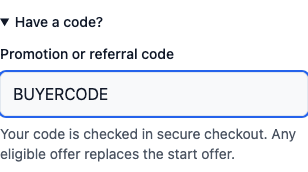
- Did he sign up without the link? He can still use your code. Your code is the part of your link after via=. At checkout he opens Have a code? and types it in Promotion or referral code.
- Come back to the Referrals page to see how it went.
One-time links for paying owners
Are you the owner, with a paid plan that is active? Then the Referrals page also shows a Give a friend a free month card. It holds a few extra links. Each one works for one business.
- Pick a link marked Not used yet.
- Tap Copy next to it and send it to one friend.
- Watch it change to Signed up, then Used.
The free month works the same way as with your main link.
Or ask Kai to call your friend
Call your own line and say, "Call my buddy Mike and tell him about you." Kai reads Mike's number back to you. He asks if Mike knows you and expects the call. Then Kai calls Mike from your line. If Mike wants it, Kai texts him a setup link with your referral code on it.
Is your friend right next to you? Say, "Show my friend." Your friend calls your number from his own phone. Kai answers like it is a real customer call.
What you will see
The Referrals page has three counts:
- Signed up from your link: everyone who came in through your link.
- Paid and confirmed: friends who finished checkout.
- Signed up, not yet paid: friends who started but have not finished.
Once you earn a free month, a line below the counts shows Free months earned so far. A friend can show as paid before your credit lands. The credit waits for his first full month.
What referrals do not do
- We never send your link for you. You choose who gets it.
- You get a bill credit, not cash.
- Your credit needs a paid plan that is active. If yours is not, we check again the next time your friend pays.
- Each friend earns the free month one time only.
- You can't earn it by sending your own business through your link.
Referrals vs. the Affiliate Program
Referrals pay you in free months. Do you send us a lot of businesses? You may want cash each month instead. That is the affiliate program.
The Referrals page has a Become an Affiliate button. It takes you to the partners page to sign up.
FAQ & Troubleshooting
My referral link did not load.
Refresh the Referrals page. Does it say Not available for your account? Then referrals are turned off for you. Contact support if that looks wrong.
When does my reward apply?
When your friend has paid for his first full month. Then we add one month of your plan as a credit. It comes off your next bill. You do not need to ask support.
My counts show zero after I shared the link.
The page counts only sign-ups that came through your link or code. Ask your friend to use your exact link. Or have him type your code under Have a code? at checkout. Still zero? Contact support.
Ready? Copy your link and send it to one owner today.
Your link is on the Referrals page. It takes one tap to copy.
Related
- Billing — where free-month credits and your plan show up
- Plans & Pricing — what your referred friend is signing up for
- Team Members — add teammates inside your own business instead of referring a new one