


How to Manage Your Subscription
View usage, change plans, and manage billing for your KaiCalls account.
How to use a code at checkout
Have a code from an offer or a friend? Enter it before you pay. You can add it when you pick a plan or return to checkout.
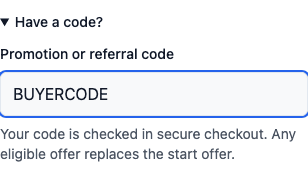
- Open Have a code? near the plan button.
- Type your code in Promotion or referral code.
- Choose your plan, or tap Pay & Activate to continue.
- Check the final price in secure checkout before you pay.
What you will see
There is no Apply button. Your code goes with you to checkout. A typed code takes the place of a code from an older link in this tab. Clear the field to leave that code out.
A code in the field does not mean you have a discount. Checkout checks the code. An offer you can use takes the place of the start offer; they do not add up. If no offer applies, the usual price or start offer may still appear.
Use letters, numbers, hyphens, or underscores. If you see an error, fix the code or clear it. To share your own link, see Referrals.
Viewing Your Plan
Open Plan in the dashboard sidebar (under Settings if you are on Advanced navigation) to see your current plan details:
- •Your current plan name and price
- •The answered calls you have used this billing cycle
- •The answered calls included in your plan
- •Next billing date
Plans Available
| Plan | Price | Included |
|---|---|---|
| Kai Backup | $10/mo | ~20 Kai-answered calls/mo |
| Kai Line | $79/mo | ~170 Kai-answered calls/mo |
| Kai Office | $349/mo | ~800 Kai-answered calls/mo |
On an older plan? Your original pricing, minutes, and terms are grandfathered and don't change.
If You Go Over
There are no per-minute overage charges. Your plan includes an expected monthly call allowance. If your call volume stays higher, we recommend the next plan and notify you before anything changes. You can choose to keep your current plan, and we move you back down if volume drops.
On a legacy plan? Calls beyond your monthly allowance are billed at a flat $0.25/min on every tier, rounded to the whole minute. Exactly as before — your terms don't change.
Failed calls and dropped calls (under 5 seconds) are excluded from billing — you are only charged for calls that actually connected.
Upgrading
Click Upgrade on the subscription page and choose the plan you want. Upgrades take effect immediately — you get the higher allowance right away.
You are prorated for the remainder of your current billing cycle. You only pay the difference between your current plan and the new one for the days remaining.
Downgrading
Click the plan you want to switch to on the subscription page. Downgrades take effect at your next renewal date — you keep your current plan's answered calls until the end of the billing cycle.
Canceling
Click Cancel Subscription on the subscription page. Your account remains active until the end of the current billing period — you do not lose access immediately.
When that period ends, Kai stops answering and your number is parked for 30 days — it is not released. It stays registered to you, callers hear a short recorded announcement instead of Kai, and resubscribing inside that window gives you the same number and the same settings back.
After the 30 days, the number is released to the carrier and your secretary configuration is deleted. That step is permanent — support cannot recover a released number.
Full detail — the timeline, keeping or moving your number, what data is kept, and how to come back — is in Canceling, keeping your number, and coming back.
Payment Methods
Click Manage Billing on the subscription page to open the Stripe customer portal. From there you can:
- •Update your credit card or payment method
- •View past invoices and download receipts
- •Update your billing address
Usage Monitoring
The Plan page shows a usage bar tracking the answered calls you have used this cycle. Keep an eye on it — if you are consistently at 80% or more of your allowance, you are close to outgrowing the plan. Nothing surcharges you for crossing the line, but a plan sized below your real call volume is worth moving off.
Tips
- •Start on Kai Backup and move up as your call volume grows. You can change plans at any time, and every plan ships the same features.
- •Failed and dropped calls under 5 seconds do not count against your allowance, so wrong numbers and hang-ups cost you nothing.
- •Check your usage weekly so a busy month tells you to resize your plan before it surprises you.
- •Downsizing keeps your number and settings. Canceling starts a 30-day clock on your number, so switch plans rather than cancel if you only need to spend less.
- •If your card is declined, update your payment method promptly to avoid service interruption.