


Pipedrive Lead Sync & Call Logging
Pipedrive Integration for AI Phone Agents (2026)
Connect KaiCalls to Pipedrive in under 10 minutes to automatically answer inbound calls, qualify leads, create or update Persons, and attach AI-generated call summaries and transcripts directly to contact profiles.

Most teams connect KaiCalls to Pipedrive in under 10 minutes once admin access is ready.
Every qualified caller lands in Pipedrive with name, inquiry type, summary, and transcript attached.
KaiCalls matches existing records by phone number first, so it updates instead of creating duplicates.
Ready to connect your Pipedrive portal?
Authorize KaiCalls to sync inbound callers, qualification details, and transcripts directly into Pipedrive.
Why Pipedrive integration matters
Inbound callers are your highest-intent leads. When sales teams rely on manual data entry, follow-ups slip through the cracks. KaiCalls answers calls immediately and syncs caller contact info and AI call notes directly into Pipedrive.
Pipedrive says more than 100,000 companies across 179 countries use Pipedrive to grow their sales pipeline. Source: Pipedrive about us
Inbound callers are automatically matched or created as Persons in Pipedrive without manual entry.
Structured call summaries capture caller intent, urgency, and key details right on the contact activity note.
Sales teams get immediate context before dialing back, improving lead conversion and follow-up speed.
How KaiCalls maps caller data to Pipedrive
The field map gives buyers a direct answer to what gets captured, where it lands, and what is required for the first production sync.
| KaiCalls captures | to | Pipedrive field | Required? |
|---|---|---|---|
| Caller name | to | Person Name | Required |
| Phone number | to | Person Phone (Work/Mobile) | Required |
| Email address | to | Person Email | Optional |
| Inquiry type | to | Custom Field / Lead Label | Optional |
| Call summary & transcript | to | Activity Note on Person | Required |
| Deal association | to | Deals / Pipeline Stage | Optional |
Step-by-step setup
Connect, map your fields, place a test call, and switch on production sync to Pipedrive.
Connect your account in KaiCalls using OAuth, API credentials, or the approved webhook path for the platform.
Map caller fields to the destination fields your team already uses for intake, sales, or service handoff.
Set trigger rules for when KaiCalls should create a new record, update an existing record, or only attach notes.
Place a test call and confirm the record appears with the expected name, phone, inquiry type, summary, and transcript.
Enable production sync, then review the first real calls for duplicate handling and required-field coverage.
See the Pipedrive integration in action
From inbound call capture to real-time sync, here is how KaiCalls and Pipedrive work together.
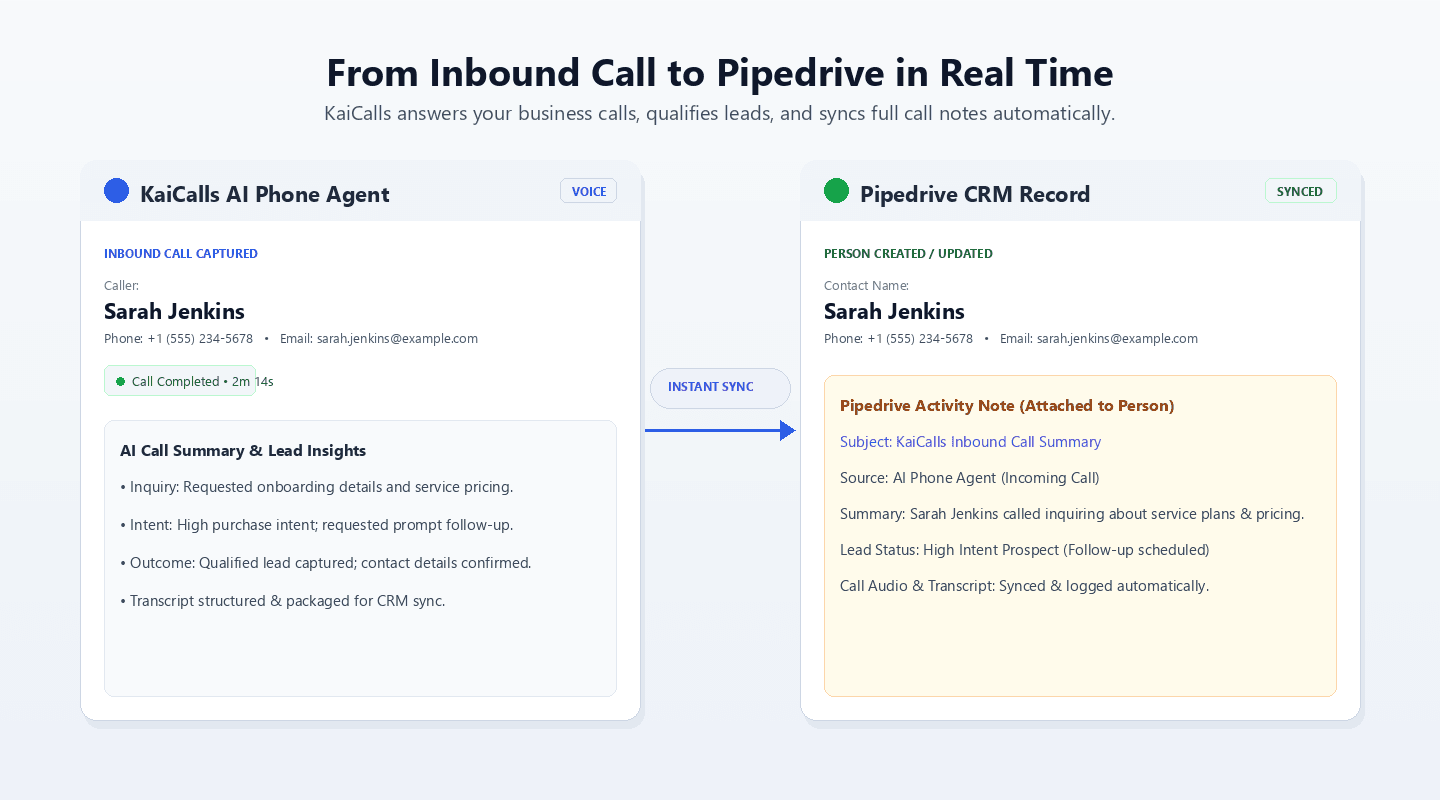
Real-time Inbound Call to Pipedrive Sync
Callers are answered by KaiCalls AI agent, qualified, and instantly synced to Pipedrive as a Person with full call notes.
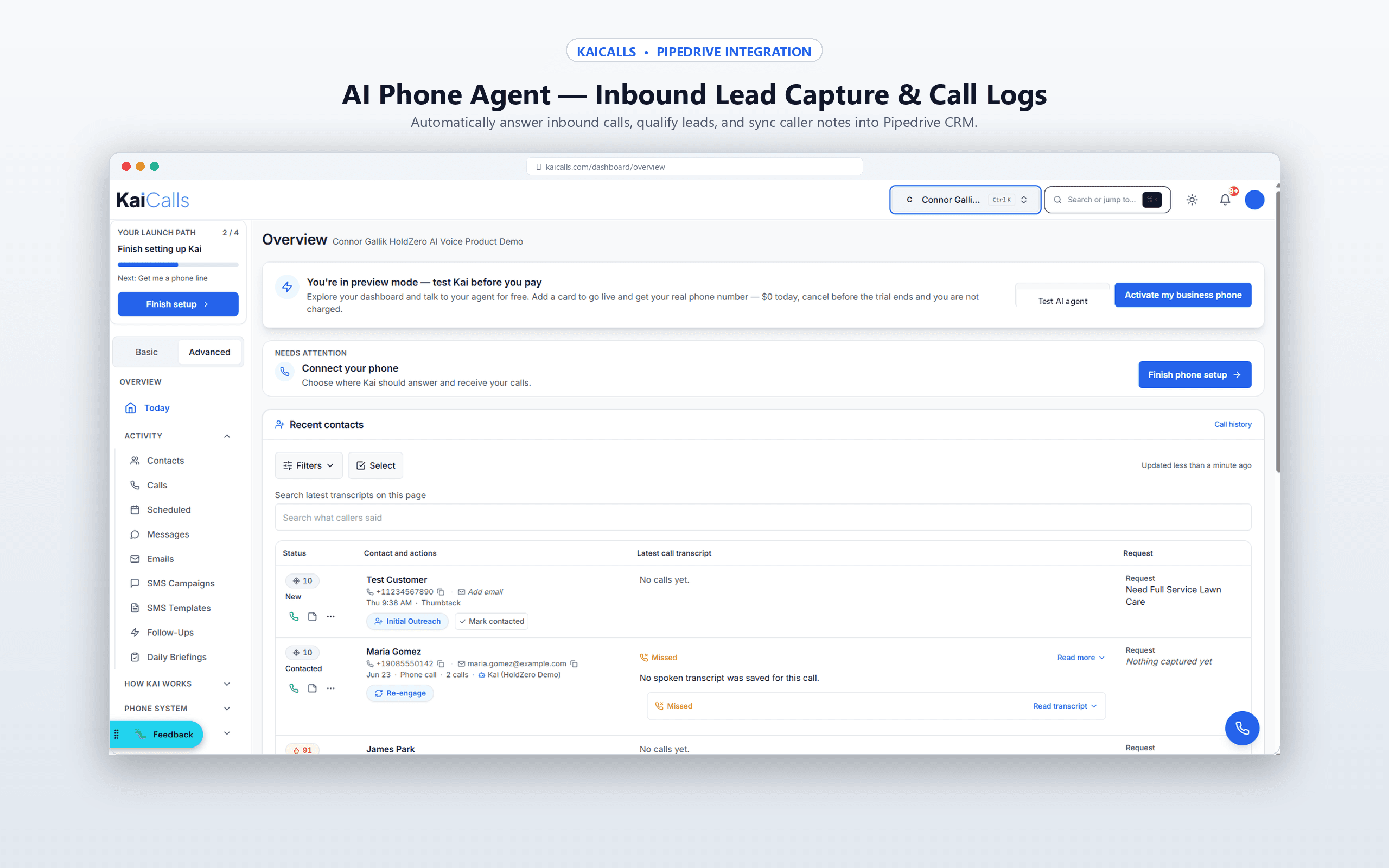
Inbound Call Capture & Activity Log
Review caller details, recordings, AI summaries, and sync status in the KaiCalls unified dashboard.
What gets synced to Pipedrive
Standard fields sync every time. Conditional fields only sync when the caller provides the data or your team enables the corresponding rule.
| Data | Destination | When it syncs |
|---|---|---|
| Caller identity (Name & Phone) | Person record | Always sent upon call completion |
| Email address | Person email field | Sent when captured by AI phone agent |
| AI call summary & action items | Activity Note attached to Person | Always attached after completed call |
| Spoken call transcript | Activity Note details | Sent when transcript capture is enabled |
| Lead status & qualification | Person or Deal label | Sent when scoring rules are active |
Common mistakes and troubleshooting
The usual snags when wiring up a new sync, and how to clear them fast.
Leads are not appearing
Confirm the connection is active, the write user has create-record permissions, and the trigger rule is enabled for qualified calls.
Duplicate contacts are being created
Match existing records by normalized phone number first, then email when present. Keep the platform's duplicate rules enabled.
Mapped fields are missing
Check whether the destination field is required, hidden, renamed, or restricted by permissions before changing the KaiCalls mapping.
Sync is delayed
Review provider rate limits, webhook retries, and workflow queues. Native writes should be near real time after the call ends.
Pipedrive integration FAQ
Answers to the questions teams ask before routing KaiCalls calls to Pipedrive.
How long does it take to connect KaiCalls to Pipedrive?+
Most teams can connect KaiCalls to Pipedrive in under 10 minutes once admin access is ready. The longest step is usually confirming which required fields your team wants populated before production sync is enabled.
Does the Pipedrive integration create duplicate contacts?+
KaiCalls checks for an existing person or deal by phone number before creating a new one. If a match exists, KaiCalls updates the existing record with the latest call summary, transcript, and qualification details instead of creating a duplicate.
What caller data syncs to Pipedrive?+
Caller name, phone number, inquiry type, call summary, call transcript, and lead score can sync to Pipedrive. Optional fields such as appointment time, source campaign, and practice area can be added when those fields exist in your workspace.
Do I need Pipedrive's API or enterprise plan to use this?+
You need a standard Pipedrive account with permissions to manage contacts and notes. KaiCalls connects via secure OAuth 2.0 with zero complex webhook setup required.
Can I customize which fields map to Pipedrive?+
Yes. KaiCalls can map captured call data to standard fields and custom fields in Pipedrive. During setup, you choose which fields are required, which are optional, and which values should only sync when the caller qualifies.
Can KaiCalls trigger Pipedrive workflows after a call?+
Yes. Once KaiCalls creates or updates the person or deal, your existing Pipedrive workflows can route the lead, notify staff, create follow-up tasks, or move the record into the next pipeline stage.
Connect Pipedrive to KaiCalls
Start with the integration parent guide, compare plan fit on pricing, or open intake to begin routing qualified callers into Pipedrive.