


Built for Rental Companies on Rentopian
Rentopian Integration for Answering Rental Calls (2026)
KaiCalls answers your rental calls and sends each one into Rentopian as a quote request. The quote shows up in your Quotes list with the caller, the event date, and the call notes, and Rentopian adds the caller to Clients and Contacts. You add the items and prices and send the quote from Rentopian like any other.

Most teams connect KaiCalls to Rentopian in under 10 minutes once admin access is ready.
Every qualified caller lands in Rentopian with name, inquiry type, summary, and transcript attached.
KaiCalls matches existing records by phone number first, so it updates instead of creating duplicates.
Why Rentopian integration matters
Rental calls come in while you are loading trucks and setting up tents. A missed call is a quote you never get to send. KaiCalls answers, takes the details, and puts the request where your team already works: the Rentopian Quotes list.
Rentopian says it has built rental software for event businesses since 2016 and has delivered results for hundreds of event businesses. Source: Rentopian home page
Every rental call becomes a quote request in Rentopian, marked Created By: Website, so nothing gets copied over by hand.
Rentopian files the caller as a client and a contact, ready for the next order.
Nothing is emailed to the caller from Rentopian. You price the quote and decide when to send it.
How KaiCalls maps caller data to Rentopian
The field map gives buyers a direct answer to what gets captured, where it lands, and what is required for the first production sync.
| KaiCalls captures | to | Rentopian field | Required? |
|---|---|---|---|
| Caller name | to | Quote client first and last name | Required |
| Email address | to | Quote client email | Optional |
| Phone number | to | Quote client phone | Optional |
| Event date | to | Quote start and end date | Optional |
| Address | to | Quote client address | Optional |
| Call summary and outcome | to | Quote notes | Required |
Step-by-step setup
Connect, map your fields, place a test call, and switch on production sync to Rentopian.
In Rentopian, open Settings, then Company Details, then API Settings. Copy the API key and the registered website URL.
In KaiCalls, open Connections, then Rentopian. Paste the website URL and the API key, then save.
Choose Send calls automatically: Off (push leads by hand), Qualified callers only, or Every caller.
Push one test lead from KaiCalls, then open Quotes in Rentopian and find it at the top, created by Website.
Delete the test quote with the Delete Quote button inside the quote.
See the Rentopian integration in action
From inbound call capture to real-time sync, here is how KaiCalls and Rentopian work together.
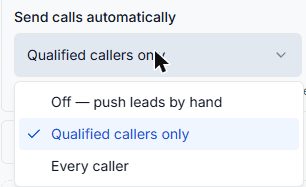
Pick which calls go to Rentopian
Off, Qualified callers only, or Every caller. Spam and test calls are skipped.
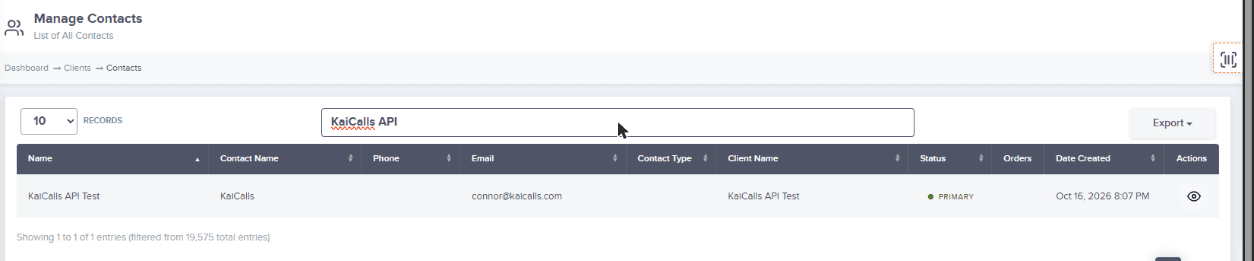
Callers land in Rentopian
Each quote request adds the caller to Rentopian Clients and Contacts.
What gets synced to Rentopian
Standard fields sync every time. Conditional fields only sync when the caller provides the data or your team enables the corresponding rule.
| Data | Destination | When it syncs |
|---|---|---|
| Quote request | Rentopian Quotes list | After each call that matches your Send calls automatically choice, or when you push a lead |
| Caller name and contact details | Rentopian client and contact | Created or reused by Rentopian when the quote is made |
| Event date | Quote start and end date | When the caller gives one; otherwise the day of the call |
| Call summary, outcome, and call link | Quote notes | On automatic sends after a call |
Common mistakes and troubleshooting
The usual snags when wiring up a new sync, and how to clear them fast.
Nothing shows up in Quotes
Check that Send calls automatically is not Off, and that the website URL matches Rentopian API Settings exactly, including https:// and www.
Authorization failed
The API key is wrong or was changed in Rentopian. Copy it again from API Settings and update it on the Rentopian card in KaiCalls.
The quote has no items
That is expected. KaiCalls sends the request, not a priced order. Add items and prices in Rentopian before you send the quote.
The caller is not in Leads
KaiCalls sends quotes, not leads, because many Rentopian plans cannot open the Leads page. Look in Quotes and in CRM, then Contacts.
Rentopian integration FAQ
Answers to the questions teams ask before routing KaiCalls calls to Rentopian.
Where do KaiCalls calls show up in Rentopian?+
In your Quotes list, as a new quote created by Website. The caller is also added to Clients and Contacts.
Does KaiCalls add rental items or prices to the quote?+
Not yet. The quote arrives at $0.00 with the caller, the date, and the call notes. You add items and prices in Rentopian.
Will Rentopian email my customer automatically?+
No. KaiCalls tells Rentopian not to send an email. Your customer hears from you when you send the priced quote.
Can I choose which calls go to Rentopian?+
Yes. Pick Off and push leads by hand, send only qualified callers, or send every caller. Spam and test calls are always skipped.
Does KaiCalls see my Rentopian orders or availability?+
No. The connection sends quote requests into Rentopian. It does not read your orders, stock, or calendar back.
Connect Rentopian to KaiCalls
Start with the integration parent guide, compare plan fit on pricing, or open intake to begin routing qualified callers into Rentopian.